


Rosetta Stone Classic (2024)
4.658.44K Reviews
App Specs
- Version
- 9.2.0
- Updated On
- License
- Free
- Downloads
- 10,000,000+
- Developer
- Rosetta Stone Ltd
- Categories
- Education
- Platform
- Android, iOS
Screenshots


 Analysis by AppCompare
I judge a language-learning app by what it lets me do when I’m tired, short on time, or learning in a place where speaking aloud would feel awkward—not just by how polished its first lesson looks. Rosetta Stone: Learn Languages is built around learning through images, spoken practice, and repeated exposure, rather than translating every phrase into English. That makes its style easy to recognize, but not automatically right for everyone. I find it most useful when I can give it my attention and want to build familiarity through practice, not when I need a quick grammar reference or an instant phrasebook.
How the visual lesson style affects readability
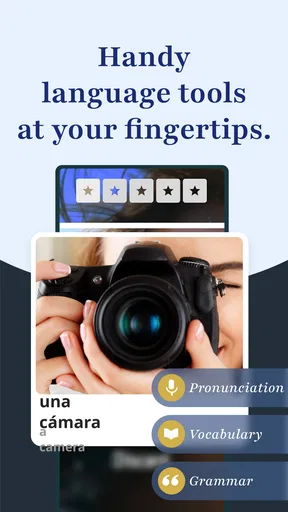
Rosetta Stone is an education app from Rosetta Stone Ltd, and its uncluttered lesson screens help keep attention on the material. Instead of presenting a dense page of explanations, lessons use images and language together, asking me to notice which words fit the situation. That can be a relief if long text blocks are difficult to process, though it also means a learner who wants explicit written rules may have to look elsewhere for explanations.
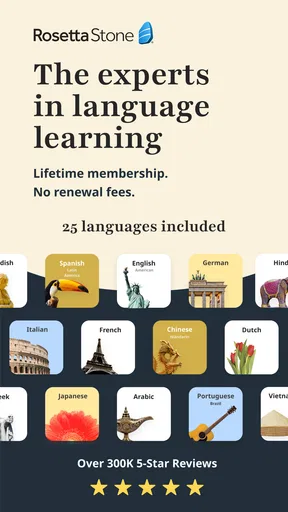
The app is available for English, Spanish, French, German, Chinese, and Japanese, among other language choices. Its broad reach is reflected in a 4.6 average from around 403,000 ratings, while more than 10 million installs suggest that many learners have tried this approach. Those figures tell me it is well established, not that every learning style will suit it. I would treat the first few lessons as a practical test: do the pictures and repeated examples help you infer meaning, or do you keep wishing for a direct translation?
Learning through seeing, listening, and speaking
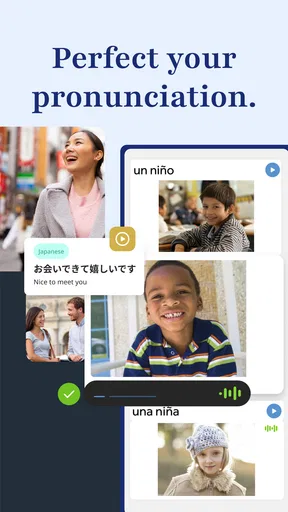
I find this section useful for thinking about how Rosetta Stone asks me to connect a picture with a spoken phrase, rather than relying on translation alone. That can help me notice meaning from context, but it also makes a deliberate pause worthwhile: I can listen once for the overall sound, then again for the detail I want to imitate. From there, it makes sense to look at what speaking practice feels like in different settings.
Diving into the lessons
The lessons in Rosetta Stone are structured in a way that feels natural. They focus a lot on immersion, which means you’re not just memorizing vocabulary. Instead, you’re actually seeing words in context and associating them with images. I found myself recognizing words and phrases without even trying too hard. It's like my brain was picking up on cues and making connections all on its own.
One of the coolest features is the speech recognition. It’s like having a personal language coach right in your pocket. I practiced saying phrases, and the app gave me feedback on my pronunciation. At first, I was a bit self-conscious, but I quickly realized how helpful it was. Plus, there’s no judgment here—just a friendly nudge to perfect that accent.
Motor and sensory considerations
The basic interaction is a cycle of looking, listening, selecting, and sometimes speaking. I like that the app asks me to produce sounds rather than keeping language practice entirely passive, but speaking into a phone is a real requirement of this learning style. If voice input is uncomfortable, difficult, or unavailable in a particular setting, I would plan sessions around the visual and listening portions rather than assume every exercise can be done silently.
Worth Reading Before You Choose

EA SPORTS FC Mobile 26 Is a Bigger Football Game, but It Takes Time

Flipboard Shows What News Apps Must Do Beyond the Feed

Switching to Android Auto Means Rethinking Your Driving Routine

Google Calendar Makes a Crowded Week Easier to Manage

Ludo King Makes the Most of the Minutes Between Plans

Baby Panda World Brings Quick Play to Modern Phones, but Its Game Library Feels Busy
Speech recognition is useful as a private rehearsal partner, but I would not treat a single result as a definitive judgment of my accent or ability. A noisy room, a quiet voice, or an unfamiliar pronunciation can make spoken practice feel less smooth. My practical tip is to repeat a phrase once at a comfortable pace before changing anything; rushing to imitate a model can make it harder to hear which part needs attention. Learners who rely on written explanations, need larger controls, or benefit from a different presentation style should try a short session on their own device before committing to a routine.
Practical usage
What I really appreciated about Rosetta Stone is how it encourages you to apply what you’ve learned in real-life scenarios. Whether you’re planning a trip or just want to impress your multilingual friends, the app gives you the tools to hold a basic conversation. I tested my skills by ordering coffee in Italian at a local café, and let me tell you, the barista was impressed!
There’s also an offline mode, which is a lifesaver if you’re like me and often find yourself without Wi-Fi. I downloaded a few lessons before hopping on a flight, and it turned a boring travel day into a productive language session.
Making practice work in everyday life
A realistic routine need not mean sitting down for a long study block. I’d use a few minutes while waiting for a train to revisit a lesson, then save speaking exercises for home or a quiet corner. Before a trip, I’d focus on phrases connected to one immediate need—finding a place, ordering food, or greeting someone—rather than racing through unrelated material. That gives the visual examples a purpose and makes it easier to notice what I can actually recall when the screen is gone.
Offline access is especially useful when a commute or flight has unreliable connectivity, but it takes a little planning: download the lessons you expect to use while you still have a connection. I would also avoid treating offline study as a substitute for conversation. It can keep a routine intact, while real people bring accents, speed, and unexpected replies that app exercises cannot fully reproduce.
For steady progress, I’d keep a small note outside the lesson with phrases I repeatedly miss or want to use soon. That turns each session into a focused revisit instead of an endless attempt to complete more screens. It also helps answer a common practical question: can this replace a tutor? For pronunciation rehearsal and regular exposure, it can be a useful companion; for detailed correction, spontaneous dialogue, or a personal explanation of why a sentence works, a teacher or conversation partner is a better complement.
Situational access and choosing the right tool
This app works best when I can look at the screen and listen without interruptions. On a crowded bus, I might do a quiet visual exercise, but I would postpone saying phrases aloud if that would draw unwanted attention. At home, I can speak more freely and use the feedback as practice. For someone who learns while walking, needs hands-free interaction, or often studies in noisy places, that dependence on visual attention and voice input may make another format more convenient.
Compared with flashcard apps, Rosetta Stone puts more emphasis on connecting a phrase to a scene and producing it, while flashcards can be quicker for reviewing a personally chosen word list. Compared with grammar-led courses, its immersion-first approach asks learners to infer patterns rather than begin with rules. Neither approach wins for every learner: I would choose this one for repeated contextual practice and pair it with a grammar reference or human conversation when explanations and flexible back-and-forth matter most.
Challenges and progress
Now, let's talk about the commitment. Learning a new language isn’t a walk in the park, and Rosetta Stone is no exception. The app does a great job of keeping you engaged, but as with anything, consistency is key. I set a reminder on my phone to practice every day, even if it was just for 10 minutes. Those little sessions add up, and it’s rewarding to see your progress unfold.
One thing I noticed is that the app might not be the best fit if you’re looking for in-depth grammar explanations. It’s more about learning through exposure and usage. But hey, that’s what makes it unique and effective in its own way.
Commitment, cost, and where it falls short
The app is free to download, with in-app purchases ranging from $0.99 to $299.99 per item, so I would check what access a particular purchase offers before building a study plan around it. The free entry point makes it easy to explore, but it does not mean every part of a full learning routine will be free. If you only want a handful of travel phrases, a simple phrasebook or free reference may be a better fit than investing in a structured course.
Rosetta Stone is rated for Everyone and runs on iOS 11 or later; the current version is 8.35.0. The app has been available since March 27, 2013, and its longevity is reassuring, though an older device still needs to meet the operating-system requirement. I would check that before planning to use it on a spare phone or tablet. The key question is not just whether it installs, but whether the device’s microphone and audio work well enough for the kind of practice the lessons encourage.
Who should skip it? I would look elsewhere if you want a course that begins with grammar charts, if you need every new expression translated directly, or if your main goal is unscripted conversation with immediate human feedback. It may also frustrate someone who cannot comfortably use a screen and microphone in the same session. Those are not small preferences: they affect whether the central learning loop feels helpful or like extra effort.
Final thoughts
All in all, my experience with Rosetta Stone: Learn Languages has been super positive. It’s user-friendly, incredibly intuitive, and genuinely fun to use. If you’re serious about learning a new language and enjoy a more immersive approach, this app is worth checking out. It’s like having a personal language tutor available 24/7, minus the hefty price tag.
So, whether you’re preparing for a trip abroad or just want to flex your brain muscles, give Rosetta Stone a spin. Who knows, you might just find yourself chatting with locals on your next adventure!
My inclusive verdict is positive but qualified: the clear visual structure and private speaking practice can make language study feel approachable, especially for someone who prefers examples over long explanations. At the same time, a screen-led lesson and voice exercises are not equally comfortable in every body, room, or daily routine. I’d try it when I can give it a quiet, regular place in my week, then add a grammar guide or real conversation if I need more direct support. That combination is more realistic than expecting one app to teach every skill in every situation.
Pros
- User-friendly interface for easy navigation.
- Wide variety of languages available to learn.
- Speech recognition for accurate pronunciation.
- Offline mode for learning without internet.
- Engaging lessons with interactive exercises.
Cons
- Subscription cost can be quite high.
- Limited cultural context in lessons.
- Some languages have fewer resources.
- Requires a stable internet for updates.
- No option for live tutor sessions.
FAQs for Rosetta Stone Classic (2024)
What features does Rosetta Stone offer for language learning?
Rosetta Stone provides an immersive language learning experience through its Dynamic Immersion method. It offers interactive lessons, speech recognition technology to perfect pronunciation, and a variety of exercises to enhance vocabulary and grammar. Additionally, the app includes phrasebooks, audio companions, and the ability to download lessons for offline use.
How effective is Rosetta Stone for beginners?
Rosetta Stone is highly effective for beginners as it emphasizes learning through context and real-world scenarios. The app starts with basic vocabulary and gradually moves to more complex concepts. Its intuitive interface and structured lessons help beginners build a strong foundation in the language without overwhelming them.
Can I learn multiple languages at once with Rosetta Stone?
Yes, Rosetta Stone allows users to learn multiple languages simultaneously. The app provides access to a wide array of languages, and you can switch between them easily. This feature is ideal for polyglots or those interested in exploring different languages, though focusing on one at a time may yield better results.
Is Rosetta Stone suitable for advanced language learners?
While Rosetta Stone is excellent for beginners and intermediate learners, advanced users might find it less challenging. The app covers fundamental to intermediate levels effectively but might lack the depth advanced learners seek. However, it remains a valuable tool for refining pronunciation and reinforcing existing knowledge.
Does Rosetta Stone require an internet connection?
Rosetta Stone requires an internet connection for initial downloads and accessing certain features. However, the app offers offline capabilities by allowing users to download lessons in advance. This is particularly useful for learning on the go without relying on a consistent internet connection.


